2022年8月7日 星期日

Install the time chrony

 https://shazi.info/chrony-%E7%B3%BB%E7%B5%B1%E6%A0%A1%E6%99%82%E5%B7%A5%E5%85%B7%EF%BC%8C%E6%8A%8A%E9%81%8E%E6%99%82%E7%9A%84-ntpdate-%E4%B8%9F%E6%8E%89%E5%90%A7/


 yum install chrony -y

 service chronyd start

chkconfig chronyd on

 vim /etc/chrony.conf

service chronyd restart


https://xyz.cinc.biz/2016/09/centos-7-chrony.html


https://access.redhat.com/documentation/en-us/red_hat_enterprise_linux/7/html/system_administrators_guide/ch-configuring_ntp_using_the_chrony_suite#sect-differences_between_ntpd_and_chronyd

2022年8月5日 星期五

Nginx 504 time out gateway


ref: https://www.cnblogs.com/lemon-flm/p/8352194.html

 nginx比较强大,可以针对单个域名请求做出单个连接超时的配置. 

比如些动态解释和静态解释可以根据业务的需求配置

proxy_connect_timeout :后端服务器连接的超时时间_发起握手等候响应超时时间

proxy_read_timeout:连接成功后_等候后端服务器响应时间_其实已经进入后端的排队之中等候处理(也可以说是后端服务器处理请求的时间)

proxy_send_timeout :后端服务器数据回传时间_就是在规定时间之内后端服务器必须传完所有的数据

nginx使用proxy模块时,默认的读取超时时间是60s。


https://tecadmin.net/increase-request-timeout-in-nginx/

Docker container crond and alpine

 ###########################

# test crond

# https://www.linuxfixes.com/2022/01/solved-docker-cron-scheduled-job-not.html

# https://www.onitroad.com/jc/linux/how-to-install-and-configure-log-roate-in-alpine-linux.html

# https://weinan.io/2019/04/06/cron.html

# https://unix.stackexchange.com/questions/375577/why-is-crond-failing-to-run-a-non-root-crontab-on-alpine-linux

#

#############################


apk list -I | grep 'log'

mkdir /etc/periodic/1min

echo "*/1     *       *       *       *       run-parts /etc/periodic/1min" >> /etc/crontabs/root


tee /etc/periodic/1min/foo <<EOF

#!/bin/sh

echo "Hello, world"

date >> /tmp/foo_crond

EOF

crond -f -l 8


# Your can run in out side to start cornd 


docker exec -d share_nginx crond -f -l 8

2022年8月3日 星期三

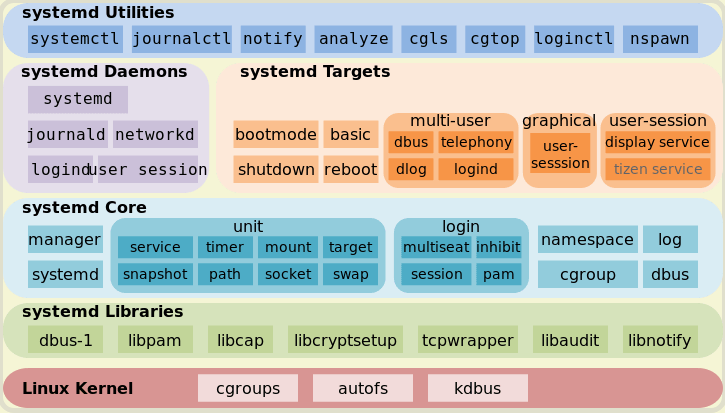
Cenot7 systemd command

https://www.3chy2.com.tw/3c%E8%B3%87%E8%A8%8A/linux-systemd-%E8%A9%B3%E7%B4%B0%E4%BB%8B%E7%B4%B9-unit%E3%80%81unit-file%E3%80%81systemctl%E3%80%81target/


Linux Systemd 詳細介紹: Unit、Unit File、Systemctl、Target

Systemd

簡介

CentOS 7 使用 Systemd 替換了SysV

Ubuntu 從 15.04 開始使用 Systemd

Systemd 是 Linux 系統工具,用來啟動守護進程,已成為大多數發行版的標準配置.....


.....


ref:

https://codingbee.net/rhcsa/rhcsa-the-target-unit

https://www.tecmint.com/list-all-running-services-under-systemd-in-linux/


nfs: https://codingbee.net/rhcsa/nfs-how-to-set-up-an-nfs-client-on-centos-7


https://www.systutorials.com/docs/linux/man/7-nfs.systemd/

https://fossies.org/linux/nfs-utils/systemd/var-lib-nfs-rpc_pipefs.mount


sourcecode

https://fossies.org/linux/nfs-utils/systemd/var-lib-nfs-rpc_pipefs.mount


2022年8月2日 星期二

C3 example

 1. D3 format

https://observablehq.com/@d3/d3-format

https://stackoverflow.com/questions/38639357/c3-js-timeseries-graph-with-percentage-y-axis

https://c3js.org/gettingstarted.html


1-5 c3:

https://hackmd.io/UEzl5wVER7-jVRZj7jqYpQ

https://hackmd.io/@ericacadu/H1k5d1Xew


2,  c3. example

https://a498390344.medium.com/d3-js-c3-js%E5%AD%B8%E7%BF%92%E7%AD%86%E8%A8%98-56ca4e2c88

https://hsuchihting.github.io/javascript/20200715/3292510004/


var chart = c3.generate({
bindto: "#chart",
data: {
columns: [
["data1", 30, 200, 100, 400, 150, 250],
["data2", 50, 20, 10, 40, 15, 25]
],
//新增 data2 的數據在右邊
axes: {
data2: "y2"
},
//自訂圖表類型
types: {
data1: "line", //指定 data1 的圖表類型
data2: "bar" // 指定 data2 的圖表類型
},
//自訂 data 顏色
colors: {
data1: "#03A9F4",
data2: "#76FF03"
}
},
legend: {
show: true //是否顯示項目
},
//客製左邊數據
axis: {
//客製 X 軸內容
x: {
type: "category",
categories: [2000, 2001, 2002, 2003, 2004, 2005],
label: {
text: "X軸名稱"
}
},
//客製 Y 軸內容
y: {
ticket:{
format: d3.format('s')
}
},
//客製右側 (data2) Y2 軸內容
y2: {
show: true,
label: {
text: "右邊Y軸名稱",
position: "outer-middle" //名稱位置
}
}
}
});


3. flask

https://stackoverflow.com/questions/51669102/how-to-pass-data-to-html-page-using-flask

https://flask.palletsprojects.com/en/0.12.x/tutorial/templates/

https://yanwei-liu.medium.com/python%E7%B6%B2%E9%A0%81%E8%A8%AD%E8%A8%88-flask%E4%BD%BF%E7%94%A8%E7%AD%86%E8%A8%98-%E4%BA%8C-89549f4986de

https://devs.tw/post/448


2022年7月27日 星期三

docker xargs and command

 1 xargs

https://shengyu7697.github.io/linux-xargs/


2.kill commad

https://stackoverflow.com/questions/27757405/how-to-kill-process-inside-container-docker-top-command

https://stackoverflow.com/questions/34552232/cant-kill-processes-originating-in-a-docker-container


docker exec -it tadeu_debian ps aux | grep ping | awk '{ print $2 }' | xargs -I{} docker exec -i tadeu_debian kill -9


3. docker command

https://docs.docker.com/engine/reference/commandline/exec/

https://devconnected.com/docker-exec-command-with-examples/

COMMAND should be an executable, a chained or a quoted command will not work. Example: docker exec -ti my_container "echo a && echo b" will not work, but docker exec -ti my_container sh -c "echo a && echo b" will

2022年7月26日 星期二

docker rm all exit container

 sudo docker ps -a | grep Exit | cut -d ' ' -f 1 | xargs sudo docker rm


https://coderwall.com/p/zguz_w/docker-remove-all-exited-containers